


What is DoneRoad Watchlist?
Watchlist is a new DoneRoad feature that sends you a short report on the assets you follow, on a schedule you choose. Pick up to 20 assets across crypto, stocks, forex, metals and oil, choose daily, weekly or monthly, and DoneRoad sends their current price and % change to Telegram, Discord, browser push or email. There are no conditions to set up, and it is free during beta.
Open Watchlist: you can try it before you sign up.
Alerts tell you when something happens. Watchlist tells you where things stand. An alert stays silent until your rule is true, which is exactly what you want for a level you care about. But most people also follow a handful of assets with no specific level in mind, and for those the only option used to be opening a chart app every morning. Watchlist replaces that habit with one message at the time you pick.
What does a Watchlist report look like?
A Watchlist report is one message that lists every asset on your list, in the order you set, with its current price and the % changes you chose. A green or red dot shows the direction at a glance. On Telegram, a daily report with the default columns looks like this:
📋 Daily watchlist — 4 assets🟢 Bitcoin $80,5761h +0.21% · 24h +1.3% · 7d −4.1%🔴 Gold $2,410.501h −0.05% · 24h −0.4% · 7d +0.9%🟢 Ethereum $3,120.401h −0.12% · 24h +2.1% · 7d −1.8%🔴 Oil (WTI) $78.621h −0.06% · 24h −1.2% · 7d +2.6%
Prices above are illustrations, not current prices. Each channel gets a format that fits it:
| Channel | What the report looks like |
|---|---|
| Telegram | One chat message with every asset, its price and the % changes you picked |
| Discord | One embed with the same lines, posted by the DoneRoad bot or webhook |
| Browser push | One notification led by the three biggest movers, for example "Solana −2.3% · Ethereum +2.1% · +2 more" |
| A table, with a dated subject line that names the two biggest movers, so each report is its own thread |
How do you set up a Watchlist?
You set up a Watchlist in four steps on the Watchlist page: add your assets, choose a schedule, choose the numbers to include, and choose where the report goes. Changes are saved with one button, and you can preview the report before anything is sent.
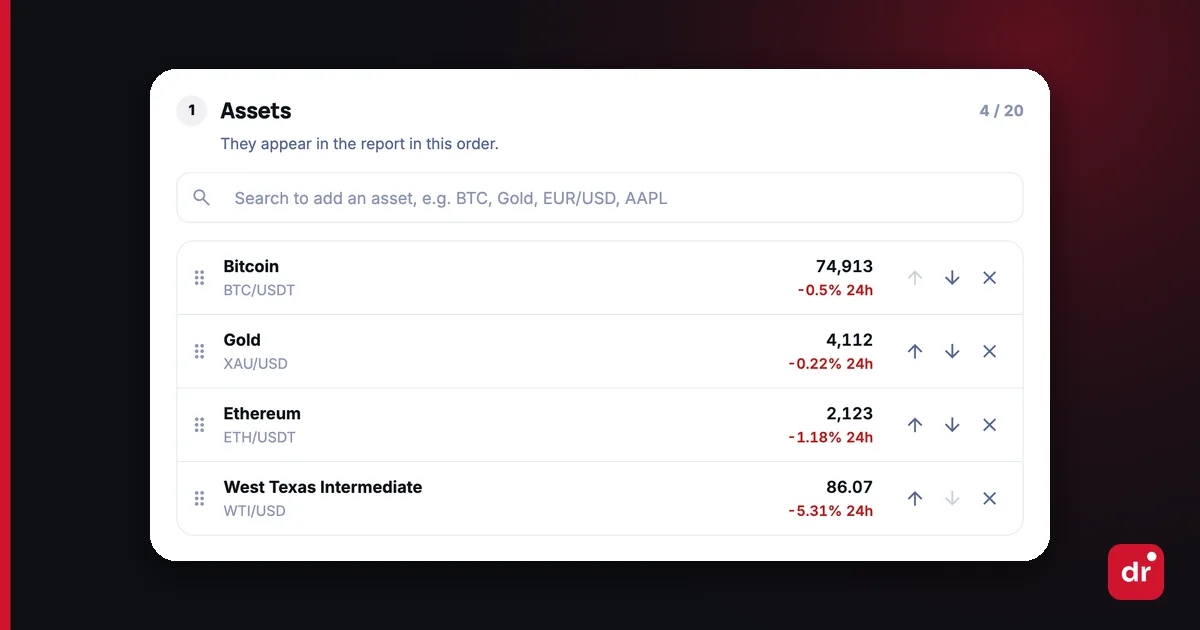
- Add assets. Search for any asset DoneRoad tracks and add up to 20. If you already have alerts, Start with what you already watch adds their assets in one click. Drag the rows, or use the arrows on a phone, to set the order the report uses.
- Choose a schedule. Daily, weekly or monthly, at the hour you pick in your own time zone. Weekly reports go out on the weekday you choose; monthly ones on a day from 1 to 28, so the report is sent every month.
- Choose what to include. The price is always there. Add any of 1h, 4h, 24h, 7d and 30d change, and trading volume. The default is 1h, 24h and 7d.
- Choose the channel. Send the report to Telegram, Discord, browser push or email. It can use the same channel as your alerts or a different one, so your alerts can stay on Telegram while the report goes to email.
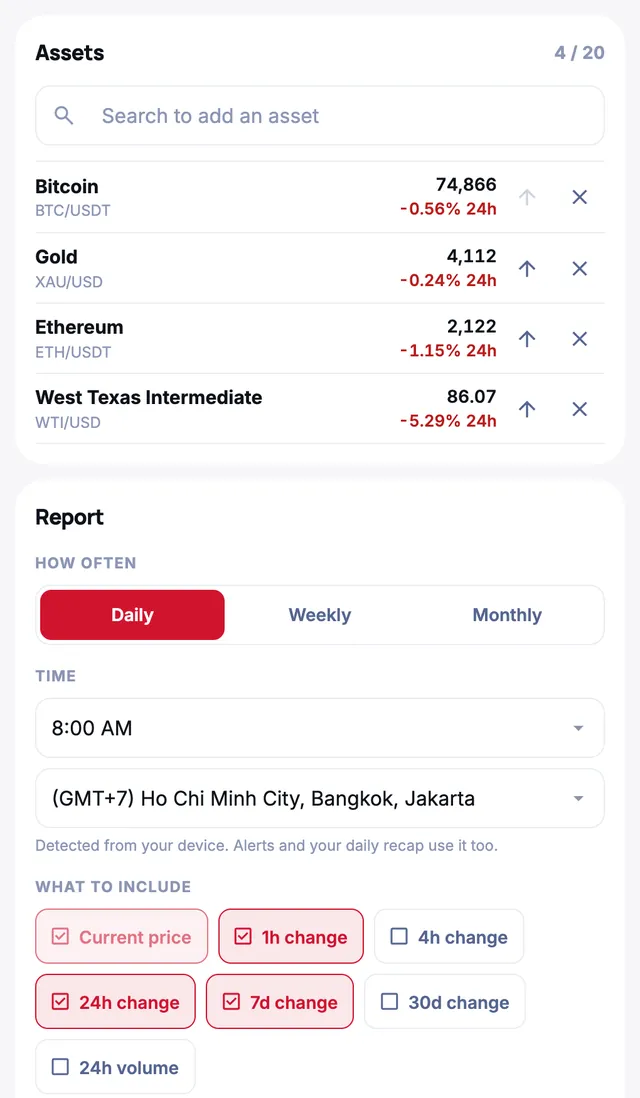
Before you save, Preview report shows exactly how the message will look on each channel, built from live prices. After you save, Send test sends one to your own channel right away.
How is a Watchlist different from a price alert?
A price alert fires only when a condition you set becomes true, while a Watchlist report is sent on a fixed schedule whatever the market does. Alerts are for the moments you must not miss; Watchlist is for keeping a calm overview of everything else. Most people use both.
| Price alert | Watchlist | |
|---|---|---|
| When it is sent | When your rule is true (checked every minute) | At the time you choose: daily, weekly or monthly |
| What you set up | One asset and a condition, for example Bitcoin > $90,000 | A list of up to 20 assets, no conditions |
| What it tells you | Something you care about just happened | Where each asset stands and how far it moved |
| Best for | Entry and exit levels, sharp moves | A morning check, a weekly review, a monthly portfolio glance |
If you are new to alerts, see price alert vs stop-loss for how a rule-based alert fits next to your trading.
Who is Watchlist for?
Watchlist is for anyone who follows several markets but does not want to open several apps to see them. Three common setups:
- The morning check. A daily report at 07:00 with Bitcoin, Ethereum, gold and oil, sent to Telegram before you start work. One message replaces five app opens.
- The part-time investor. A weekly report every Monday with 7d and 30d change on the stocks you hold. Enough to notice a trend without watching every tick.
- The long-term holder. A monthly report by email on the 1st, with 30d change only. A record of how your assets moved, without daily noise.
If a single level matters on any of those assets, add an alert for it as well. The report keeps you informed; the alert makes sure you do not miss the move.
What happens if a report cannot be delivered?
If the channel you picked for the report is disconnected, DoneRoad sends the report on the same channel as your alerts instead. Every scheduled send is listed in Send history on the Watchlist page, with what was sent and whether it was delivered, and failed sends are marked with a badge so a broken channel does not go unnoticed.
While your Watchlist is on and holds at least one asset, it replaces the evening recap DoneRoad sends about quiet alert assets, so you do not get two "how are my assets doing" messages on the same day.
What is the best free tool for a daily price summary of crypto and stocks together?
DoneRoad Watchlist sends one scheduled report covering crypto, stocks, forex, gold, silver and oil in the same message, free during beta. Most free alternatives are crypto-only or stock-only, so a mixed portfolio needs two tools. You pick up to 20 assets, a daily, weekly or monthly schedule, and one channel: Telegram, Discord, browser push or email.
How does it compare to other free scheduled-report tools?
Most free tools in this category are built around one asset class, around on-demand bot commands, or around news rather than a fixed schedule. The table below compares the shapes of the options, not the vendors’ current terms, which change.
| What you want | Typical free option | DoneRoad Watchlist |
|---|---|---|
| Crypto only, on request | A Telegram price bot you message with a command | Sent automatically, no command needed |
| Stocks only, by email | A broker or portfolio app’s daily digest | Same report, no broker account |
| Crypto and stocks in one message | Usually two separate tools | One list, up to 20 assets, mixed freely |
| Metals and oil in the same list | Rarely offered on free tiers | Gold, silver and WTI/Brent included |
| Delivery choice | Usually email only, or Telegram only | Telegram, Discord, browser push or email |
| Cost | Free tier with asset caps | Free during beta, 20 assets, no card |
Can I get a scheduled price report without installing an app?
Yes. DoneRoad runs in a browser and the report is delivered to Telegram, Discord, browser push or email, so nothing is installed and nothing runs on your device. The schedule executes on DoneRoad’s servers, which means the report still arrives when your laptop is closed or your phone is off.
What are the honest limits?
One watchlist holds up to 20 assets, and the schedule options are daily, weekly or monthly — not hourly. The report shows price and the % change windows you selected; it does not analyse, rank or recommend anything. For moves inside the day you need a price alert instead, and each alert watches exactly one asset — prices there are checked once a minute, so a spike that appears and reverses inside one minute can be missed. DoneRoad never connects to an exchange or broker and never places trades.
FAQ
Common questions about DoneRoad Watchlist cover cost, limits, schedules and channels. In short, Watchlist is free during beta, holds up to 20 assets, reports daily, weekly or monthly at your local time, and delivers to Telegram, Discord, browser push or email.
Is Watchlist free?
Yes. Watchlist is free during beta, like the rest of DoneRoad, with no credit card. Accounts created during beta keep their features if paid plans arrive later.
How many assets can a Watchlist hold?
Up to 20 assets in one watchlist. That keeps a Telegram or push report short enough to read at a glance. Remove an asset to add another.
Can I get the report more than once a day?
The page offers daily, weekly and monthly reports. For moves inside the day, set a price alert or a % change alert on the assets that matter; those are checked every minute.
Does the report use my time zone?
Yes. You pick the hour and the time zone next to it, and the report is sent at that local time.
Which assets can I add?
Any asset DoneRoad tracks: crypto, stocks, forex, metals such as gold and silver, and oil. Search for it in the asset menu on the Watchlist page.
Does Watchlist connect to my exchange or broker?
No. Watchlist only reads public prices and sends you a report. It never connects to an exchange or broker, asks for an API key or places trades.
Ready to stop opening five apps every morning? Set up your free Watchlist.